Shaders
Make a glow, a sky or a water surface: a shader computes a colour for every pixel it draws. You build one on a node graph, or write it as text, and see it in the scene as you edit.
Shaders are files in the project, shaders/<name>.shader.json. An entity draws one with a
Shader Effect component. The exported game draws them the same way.
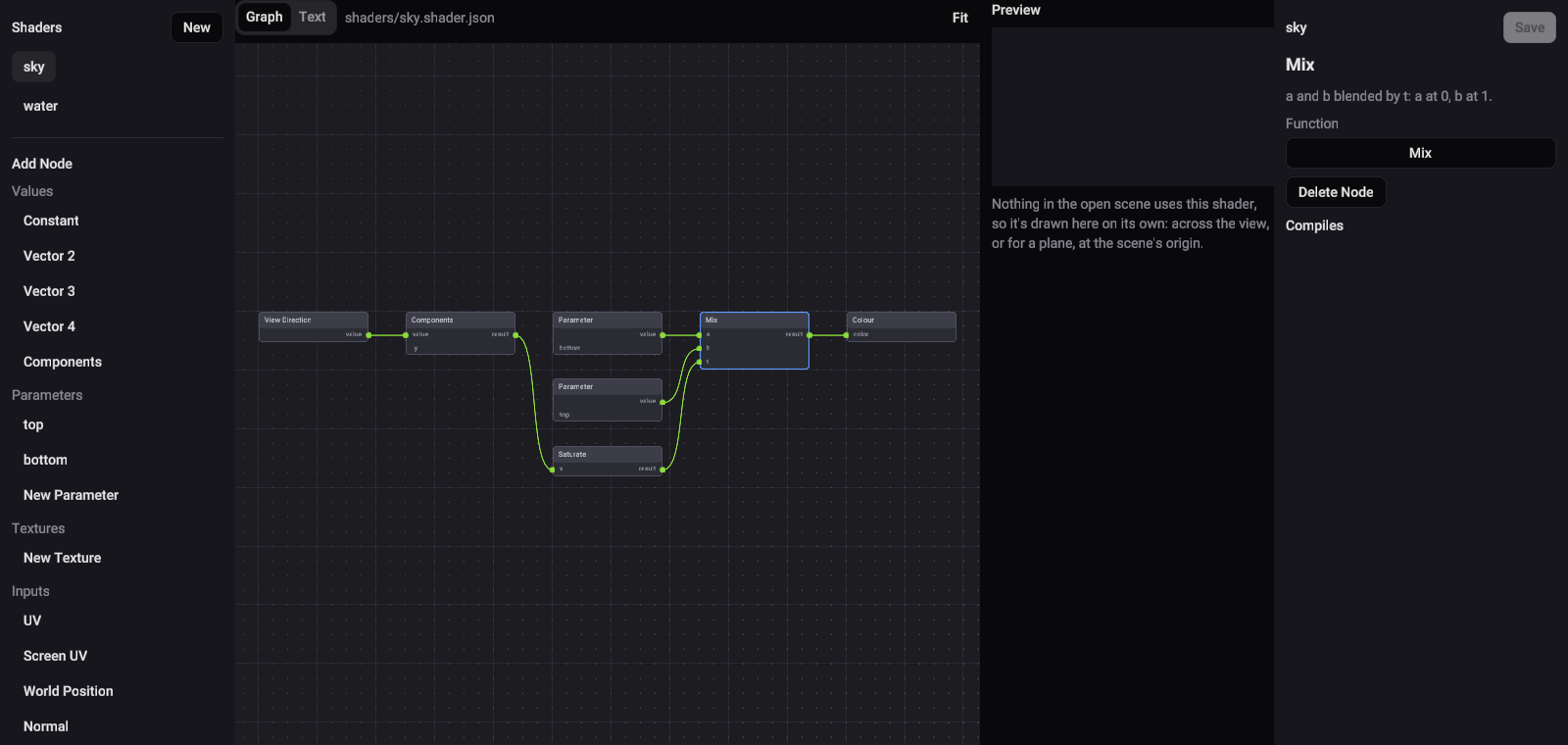
Make a shader
- Switch to the Shader view.
- In the sidebar, press New. Studio starts a shader under
shaders/: a sky that fades between two colours. - Build it on the graph (below), or switch to Text to edit it as a document.
- Press Save to write the file.
The Preview beside the graph shows the open scene with the shader drawn where the scene uses it. While nothing in the scene uses it, the preview draws it on its own.
Each edit that compiles shows straight away, with no restart. An edit that doesn't compile lists each problem and outlines the node it's on, and the preview keeps drawing the last version that did compile.
The graph
The Graph and Text tabs over the editor are two views of one shader: an edit in either shows in the other.
- Add Node in the sidebar lists everything a shader can use: values, the shader's own
parameters and textures, the inputs the engine supplies (such as
UV,timeand the view direction), maths, functions such asmixandsmoothstep, and conditions. - Wire nodes together into the Colour node, the colour the shader draws. On a plane, a Displacement node moves the points of its surface.
- Click a node to edit it in the inspector: a constant's numbers, which parameter or texture it reads, or which function or operator it is. Its wires stay attached.
- With no node selected, the inspector edits the shader itself: its name, its surface, a plane's size and blend, and its parameters and textures.
- New Parameter and New Texture in Add Node declare a value or a picture the scene can set.
An input left unwired reads 0. A wire that makes a loop is listed as a problem too. Fit frames the whole graph.
Undo, Redo and Delete act on the shader while the Shader view is showing.
Where the nodes sit is kept in a layout file beside the shader (*.shader.layout.json), so the
shader file a game loads holds only the shader.
The text
Text shows the shader as its document. The Insert list beside it has the shader's own
parameters and textures, every input and function, and the maths that joins them; a click puts the
piece in at the cursor, with a 0 for each argument to fill in.
Statements (let, var, if and for) are edited here only. The graph can use a value a let
or var names, but doesn't show the statement itself. The Starter's coin glow uses let, so part
of it is in the text.
The engine's shader document reference lists every key, input, function and limit.
Draw a shader in the scene
- Select an entity in the Scene view.
- In the inspector, use Add Component › Shader Effect.
- Pick the shader in its Shader field.
Each parameter and texture the shader declares gets a field of its own type on the component: a number, a vector, a colour or a picture. That's how two entities draw one shader differently.
Play draws the scene's shader effects too, including edits you haven't saved, and an edit made while Play runs shows in the running game.
Surfaces
A shader's Surface says what it draws:
| Surface | Draws |
|---|---|
| plane | A flat rectangle in the scene, at the entity, lying flat and facing up. Its size is in metres. Its blend can be opaque, alpha, or additive for glows. |
| background | The whole screen behind the scene, like a sky. |
| overlay | The whole screen over the scene. |
The Starter's coin-glow is a 2 by 2 metre additive plane. Each coin has a child, such as
Coin 1 Glow, with a Shader Effect that draws it on the ground under the coin, and its glow colour and
speed parameters set how it pulses.